
Ergonomics for Calligraphy and Engraving is the foundation of safe, sustainable, and precise artistic work. It means designing your desk, chair, lighting, posture, and hand position to protect your body while creating detailed lettering and engraving. When done correctly, it reduces pain, prevents injury, improves line control, and helps artists work longer without strain.
Contents
- 1 What Is Ergonomics for Calligraphy and Engraving? And Why is it Non-Negotiable?
- 2 Learning proper ergonomics for calligraphy and engraving early protects your health and your craft.Common Injuries
- 3 Why Ergonomics for Calligraphy and Engraving Improves Precision
- 4 1. Desk Setup for Ergonomics for Calligraphy and Engraving
- 5 2. Chair Selection and Lumbar Support
- 6 3. Hand Position And Grip
- 7 4. Lighting Affects Posture
- 8 5. Scheduled Breaks
- 9 6. A Regular Stretching Routine
- 10 Real Experience: Why Ergonomics for Calligraphy and Engraving Cannot Be Ignored
- 11 7. Ergonomics for Digital Tools
- 12 Long-Term Benefits
- 13 Conclusion: Make Ergonomics for Calligraphy and Engraving a Daily Habit
- 14 Frequently Asked Questions
- 14.1 1. What is ergonomics for calligraphy and engraving?
- 14.2 2. Why is ergonomics for calligraphy and engraving important?
- 14.3 3. Can poor ergonomics cause wrist pain?
- 14.4 4. How often should I take breaks?
- 14.5 5. What chair supports calligraphy and engraving best?
- 14.6 6. Does lighting affect calligraphy and engraving?
- 14.7 7. Can stretching improve calligraphy and engraving?
- 14.8 8. Is digital engraving safer?
- 14.9 9. How do I protect my shoulders?
- 14.10 10. What grip pressure is ideal?
- 14.11 11. Can posture affect art quality?
- 14.12 12. How long can I work safely?
- 14.13 13. Are thicker pen holders better?
- 14.14 14. Does breathing matter?
- 14.15 15. Can beginners ignore ergonomics?
- 14.16 16. What are early warning signs?
- 14.17 17. Is lumbar support necessary?
- 14.18 18. Can ergonomics increase productivity?
- 14.19 19. Should I learn posture techniques from experts?
- 14.20 20. When should I see a doctor?
- 15 NAP
What Is Ergonomics for Calligraphy and Engraving? And Why is it Non-Negotiable?
Ergonomics for calligraphy and engraving is the science of fitting your workspace to your body instead of forcing your body to adjust to your tools.
Calligraphy and engraving require:
- Small hand movements
- Repeated strokes
- Forward leaning posture
- Deep concentration
Over time, poor posture creates tension in the neck, shoulders, wrists, and lower back.
According to occupational health studies, nearly 30 percent of professionals who perform repetitive fine motor tasks experience musculoskeletal discomfort. Artists are at similar risk.
Learning proper ergonomics for calligraphy and engraving early protects your health and your craft.
Common Injuries
Wrist Strain
Repeated bending inflames tendons.
Carpal Tunnel Syndrome
Nerve compression causes numbness.
Text Neck
Forward head posture stresses the spine.
Shoulder Tightness
Raised shoulders create chronic tension.
Lower Back Pain
Poor seating weakens lumbar muscles.
Many artists only realize the importance of ergonomics for calligraphy and engraving after pain begins. It is better to prevent than repair.
Why Ergonomics for Calligraphy and Engraving Improves Precision
Precision is not just skill. It is stability.
If your shoulders are tight or your wrist is bent, your strokes lose control. It creates,
- Steady hands
- Better pressure control
- Cleaner curves
- Longer focus time
- Less fatigue
Professionals who maintain strong posture habits often advise beginners to learn from the best calligraphy and engraving artist in Chennai, because expert artists understand that posture directly affects performance.
1. Desk Setup for Ergonomics for Calligraphy and Engraving
Your desk controls your posture.
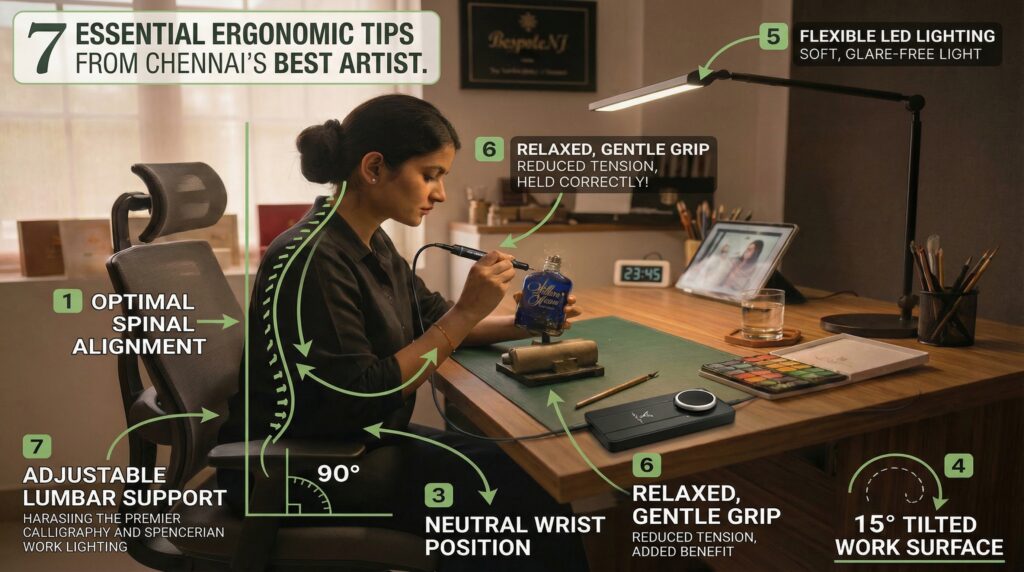
- Keep elbows at 90 degrees
- Allow relaxed shoulders
- Maintain straight wrists
- Reduce forward leaning
A 10 to 20 degree tilt surface reduces neck strain. Many professionals, including the best calligraphy and engraving artist in Chennai, prefer angled boards for better control.
You can see how professional studio discipline supports quality work at https://bespokenj.in/
2. Chair Selection and Lumbar Support
Your chair must support your spine.
For effectiveness choose:
- Adjustable height
- Lumbar support
- Stable base
- Firm cushioning
Feet flat on the floor. Knees at 90 degrees. Back fully supported.
Professional artists often emphasize that posture habits separate amateurs from experts. That is why many recommend learning workspace setup from the best calligraphy and engraving artist in Chennai.
3. Hand Position And Grip
Your hands are your tools.
Protect them by:
- Keeping wrists neutral
- Avoiding sharp bends
- Using a light grip
- Relaxing fingers
Grip pressure should be gentle. Excess pressure increases fatigue.
4. Lighting Affects Posture
Lighting affects posture more than most artists realize.
Poor lighting makes you lean forward.
It requires:
- Soft white light
- Minimal glare
- Light placed opposite your writing hand
- Clear visibility without shadow
Professional studios follow strict lighting discipline. This is another reason artists are encouraged to learn from the best calligraphy and engraving artist in Chennai who prioritize structured setups.
5. Scheduled Breaks
Even perfect posture needs rest.
Follow the 25-5 rule:
Work 25 minutes. Rest 5 minutes.
During breaks:
- Stretch fingers
- Roll shoulders
- Rotate wrists
- Stand and walk
Breaks protect long-term ergonomics for calligraphy and engraving health.
6. A Regular Stretching Routine
Wrist Stretch
Extend arm. Gently pull fingers back.
Neck Stretch
Tilt head side to side slowly.
Shoulder Rolls
Rotate forward and backward.
Stretching improves circulation and strengthens calligraphy and engraving practice.
Real Experience: Why Ergonomics for Calligraphy and Engraving Cannot Be Ignored
Many artists share lessons only after injury.
A real discussion about hand strain and recovery can be found here:
https://www.reddit.com/user/Defiant_Bison_3534/comments/1r99m6h/check_out_what_i_learned_after_my_hand_gave_up/
Stories like this prove that ergonomics for calligraphy and engraving protects careers.
Experienced professionals often repeat the same advice: learn proper setup techniques early from the best calligraphy and engraving artist in Chennai to avoid costly mistakes.
7. Ergonomics for Digital Tools
Tablet users must also follow
- Screen at eye level
- Neutral wrist position
- Proper stylus grip
- No neck bending
Even digital precision requires discipline. Many successful artists credit their posture habits and guidance from the best calligraphy and engraving artist in Chennai for maintaining long careers.
Long-Term Benefits
When you commit to strong ergonomics, you gain:
- Better precision
- Less fatigue
- Higher productivity
- Stronger posture
- Longer career life
Healthy artists create consistent luxury results.
Those who train seriously understand that workspace setup is part of skill development. Many beginners accelerate their growth when they learn from the best calligraphy and engraving artist in Chennai, who combine technique with professional discipline.
Conclusion: Make Ergonomics for Calligraphy and Engraving a Daily Habit
Your posture affects your precision.
Your hand health affects your future.
Ignoring discomfort risks long-term damage. Improving ergonomics for calligraphy and engraving protects your body and strengthens your craft.
Adjust your chair. Align your desk. Relax your grip. Take breaks.
And if you want to understand professional-level discipline, consider observing or learning from the best calligraphy and engraving artist in Chennai, where posture, precision, and quality go hand in hand.
Frequently Asked Questions
1. What is ergonomics for calligraphy and engraving?
It is designing your workspace to protect posture and hand health.
2. Why is ergonomics for calligraphy and engraving important?
It prevents injury and improves precision.
3. Can poor ergonomics cause wrist pain?
Yes. Repetitive strain can inflame tendons.
4. How often should I take breaks?
Every 25 to 45 minutes.
5. What chair supports calligraphy and engraving best?
An adjustable chair with lumbar support.
6. Does lighting affect calligraphy and engraving?
Yes. Poor lighting causes leaning.
7. Can stretching improve calligraphy and engraving?
Yes. It reduces stiffness.
8. Is digital engraving safer?
Only if posture is correct.
9. How do I protect my shoulders?
Keep them relaxed and supported.
10. What grip pressure is ideal?
Light and controlled.
11. Can posture affect art quality?
Yes. Pain reduces control.
12. How long can I work safely?
No more than 90 minutes without a break.
13. Are thicker pen holders better?
Often yes. They reduce strain.
14. Does breathing matter?
Yes. Tension affects muscles.
15. Can beginners ignore ergonomics?
No. Prevention starts early.
16. What are early warning signs?
Tingling, stiffness, headaches.
17. Is lumbar support necessary?
Yes. It protects the spine.
18. Can ergonomics increase productivity?
Yes. Comfort improves focus.
19. Should I learn posture techniques from experts?
Yes. Learning from the best calligraphy and engraving artist in Chennai ensures correct habits.
20. When should I see a doctor?
If pain continues for weeks.
NAP
Business Name: Bespokenj by Neha Jain
Website: https://bespokenj.in/
Contact Page: https://bespokenj.in/contact-us/
Location: Chennai, Tamil Nadu, India